Every browser looks the same, works the same, and thinks the same. We think it's time for a different way to browse the web.
Drift is available on
macOS Apple Silicon and
macOS Intel. Windows is coming soon.
Free, open source, and everything stays on your machine.

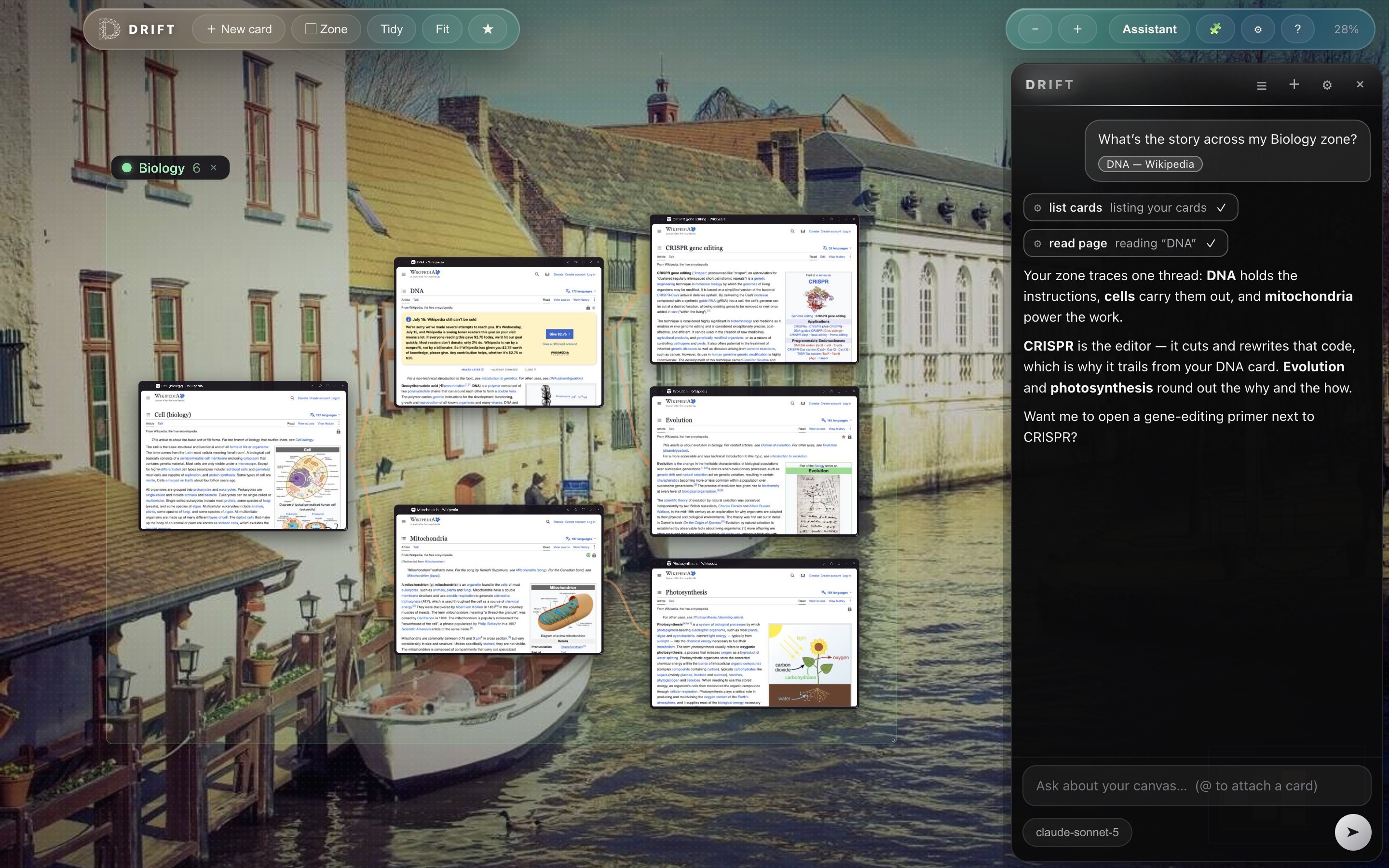
Zoom out and your whole session becomes a constellation of live page thumbnails. Dive in and every card is a full browser page: logins, video, and web apps all work.
Links that would open “a new tab” spawn a child card with a visible trail back to where you came from. Draw trails yourself by dragging between cards, double-click a trail to remove it, and export any trail as a Markdown reading list.
Pan, pinch, and fly. ⌘0 fits your whole world on screen.
Your path through the web, drawn as a map instead of a hidden history list.
Name a region like “Trip planning” or “Biology”, recolor it, move it as one.
Focus a card, pin two side-by-side, or go truly full screen. Esc floats you back.
Star pages, sort them into folders, and import your bookmarks straight from Chrome, Brave, or Firefox. ⌘F lights up matches right on the canvas.
Install ad blockers and more straight from the Chrome Web Store. Icons sit in the toolbar and work on every card.
Keep the rotating photo backdrops, pick a solid color, or drop in your own image from Settings.
No accounts, no sync servers, no browsing log. Your canvas lives on your machine.
Drift is a rethink of the browser for people who use the web to think: researchers, writers, planners, and the deeply curious. Your pages stay laid out in front of you as a map you can reason over, instead of a row of tabs that vanish the moment you open one more.
Each install is completely yours: your own canvas, your own bookmarks, your own zones. Close something by accident? Right-click → reopen closed card.
Every card is a real, sandboxed browser page, the same engine you already trust, arranged the way your head actually works.
Ask the built-in assistant and it browses beside you, opening cards, reading pages, drawing the trails between them.
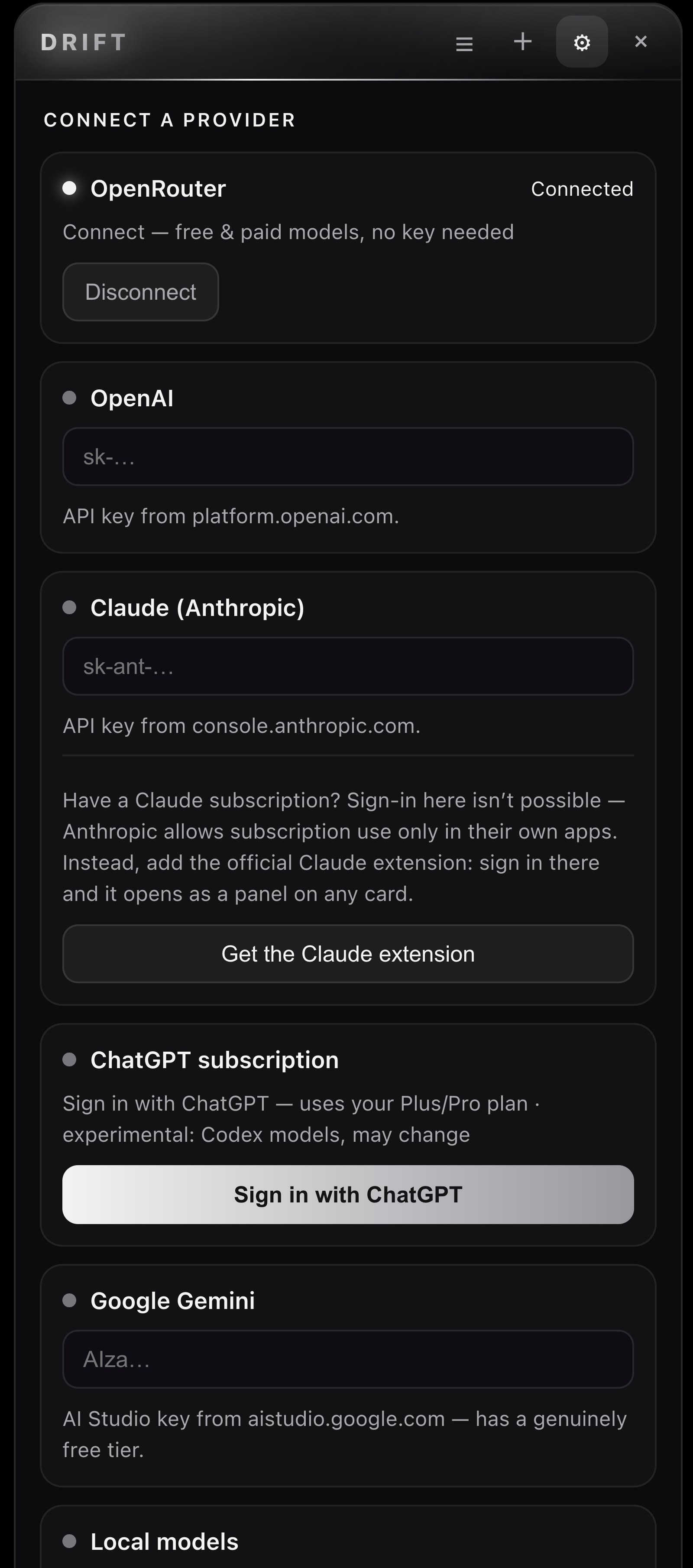
Bring your own models: an API key, your ChatGPT plan, OpenRouter, or something running quietly on your Mac. Keys stay in your keychain, it asks before acting on a site, and your questions go to your provider, nowhere else.
“Compare these three pages” becomes cards and trails on your canvas, not a wall of text.
Your keys, your ChatGPT plan, OpenRouter, or local models. Your choice, your account.
Acting on a site needs your yes, and Esc always stops it.

Connect an API key, your ChatGPT plan, OpenRouter, or a local model. Your account, your choice.
Chrome squeezes your research into a row of identical little rectangles. Drift lays it out as a map, so fifty pages stay fifty visible places you can actually find again.
Try Drift insteadFirefox fights for a private web, and we respect that. Drift keeps everything on your machine too, then rethinks the surface: visible trails and zones instead of hidden history lists.
Try Drift insteadEdge straps an assistant onto the same old tab strip. Drift changes the strip itself: your session becomes a canvas you can zoom, arrange, and think on.
Try Drift insteadThe address bar, the tab strip, the history list: unchanged since the nineties. Drift is what browsing looks like when you start from a blank canvas instead.
Try Drift insteadYes. Drift is free and open source under the GPL-3.0 license. No accounts, no subscriptions, no upsells.
A browser that lays your pages out as cards on a zoomable canvas instead of a row of tabs, so your session looks like a map. Read the full explainer.
macOS, on both Apple Silicon and Intel Macs. A Windows build is coming soon.
Yes. Install ad blockers and other extensions straight from the Chrome Web Store; their icons live in the Drift toolbar.
No. There are no accounts, no sync servers, and no browsing log. Your canvas and bookmarks stay on your machine.
Chromium, via Electron. Every card is a real sandboxed browser page, so logins, video, and web apps all work like you expect.